Malibel is accessible across Europe 🇪🇺 It’s a sales platform that helps people earn money and businesses sell more. Join today.


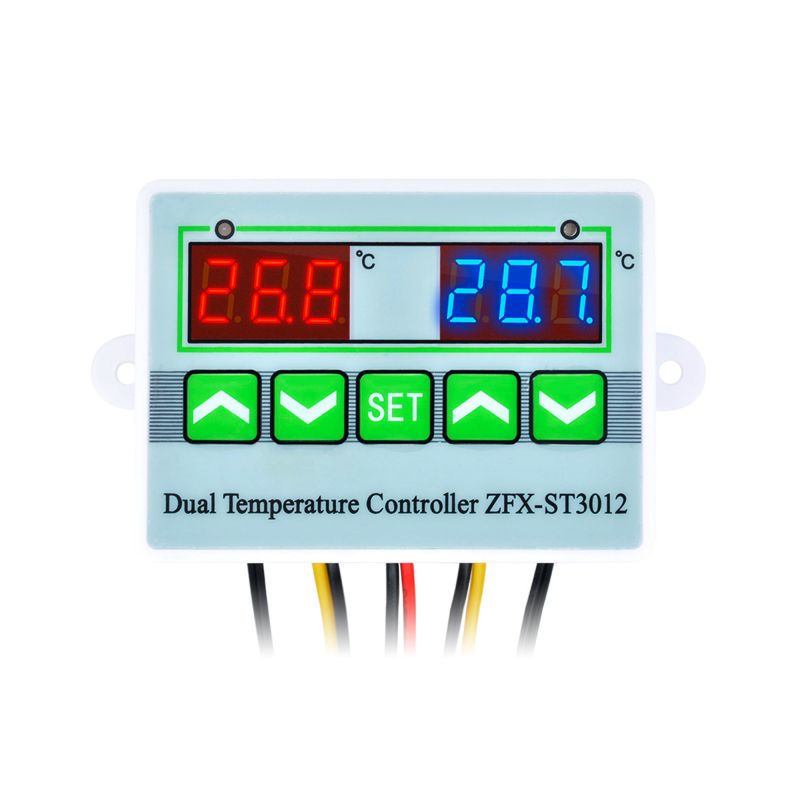
230 V Thermostat ZFX-ST3012 E6135
Malibel ID: MAL-133170
Sold and shipped by a verified Malibel partner.
Description
PRODUCT PARAMETERS AND FEATURESThis device contains two independent thermostats with separate sensors in a single controller.The controller is designed for automatic temperature regulation in two locations and devices.Simple and intuitive operation.The device has built-in settings memory. If the power supply is disconnected, the thermostat does not need to be programmed again.Clearly visible LEDs indicate an activated relay and an triggered alarm.The device has an alarm for exceeding the lower or upper temperature limit.The alarm is indicated by a sound, the display, and a flashing indicator LED.Input voltage (power supply): AC 230 V; the thermostat does not require a power supply.Relay contact load capacity: 5 A at AC 230 VTemperature measurement range: -50°C – +110°CTemperature measurement resolution: 0.1°CTemperature refresh rate: 0.5 s (very fast)Temperature probe: waterproof (stainless steel)Sensor used: NTC10k/343SLength of the cable with probe: 95 cm (longer versions are available in our range).Length of the remaining cables: approximately 20 cmProbe diameter: 4 mmProbe length: 20 mmDisplays: 2x 3-digit LEDDisplay colour: redIndicator LED colour: green/red (relay/alarm)Housing dimensions without mounts: 76 x 55 x 31 mmMounting hole spacing: 88 mmOperating temperature: 0°C – 50°CWeight: 100 gA description of the connections and the operating instructions are shown below in the graphics.Operating instructionsThermostat 2 (the “up” and “down” buttons below the right display) is programmed in the same way as thermostat 1 (the “up” and “down” buttons below the left display).Setting the temperature of thermostat 1:Press SET once, then use the “up” and “down” buttons to set the temperature (holding the button down speeds up the temperature change).Setting the temperature of thermostat 2:Press SET twice, then use the “up” and “down” buttons to set the temperature (holding the button down speeds up the temperature change).MENU of thermostat 1:Press SET once, then press and hold SET for 2 seconds to enter the MENU.MENU of thermostat 2:Press SET twice, then press and hold SET for 2 seconds to enter the MENU.Use the “up” and “down” buttons to select one of the several functions available in the MENU.MENU (setting ranges in brackets):HC – Heating “H” / Cooling “C”.D – difference in °C between the set temperature and the relay activation temperature (1–30°C).LS – low-temperature alarm (from -50°C to +109°C). The alarm is indicated by a sound, a flashing red LED, and the display showing “-L-”.HS – high-temperature alarm (from -49°C to +110°C). The alarm is indicated by a sound, a flashing red LED, and the display showing “-H-”.CA – temperature display correction (calibration) (from -10°C to 10°C).PT – relay activation delay (0–10 min)Press SET to select the desired function, then use the “up” and “down” buttons to change the value.Press SET to return to the function selection.After 5 seconds of inactivity (regardless of where you are in the MENU), the device saves the settings and returns to displaying the temperature.A flashing red LED indicates that the PT delay time is being counted down.
Return and Refund Policy
You can return products within 14 days of delivery. If a product is wrong, damaged or faulty, Malibel pays the return. See our returns policy.