Malibel.com is accessible across Europe 🇪🇺 It’s a sales platform that helps people earn money and businesses sell more. Join today.


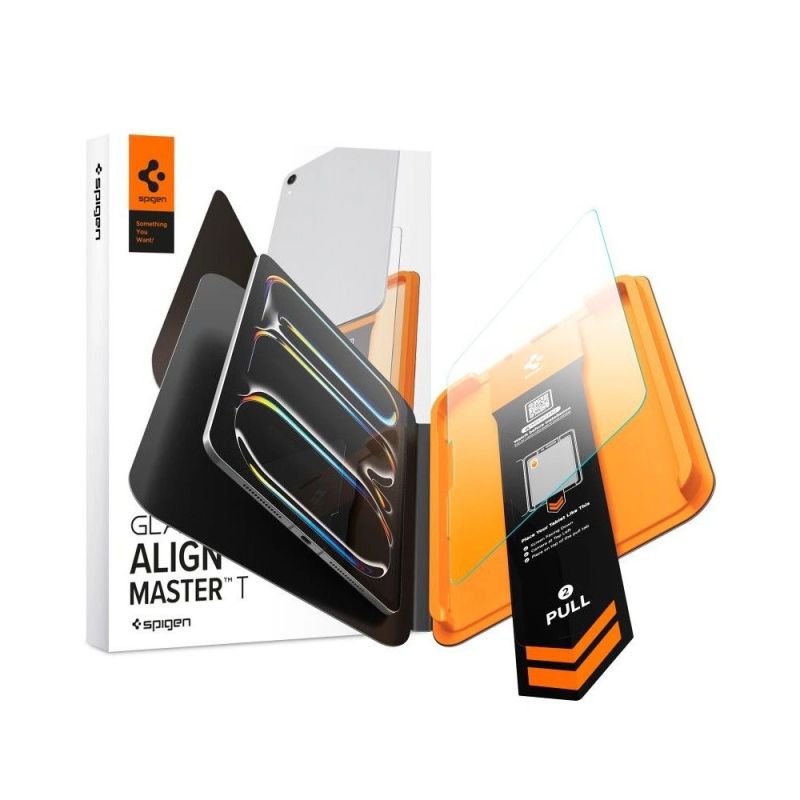

Spigen ALM Glas.tR T Tempered Glass Screen Protector for iPad Pro 13" (2024/2025/2026)
Malibel ID: MAL-134733
Sold and shipped by a verified Malibel partner.
Description
Description Tempered glass Spigen ALM Glas.tR T is a military-grade 10H+ display protection that shields your screen from scratches and impacts during everyday use. Crystal-clear glass delivers maximum light transmission without distortion, preserving the natural brightness and sharpness of the image. Full touch responsiveness and precise Apple Pencil support remain completely unaffected after the glass is applied. The AlignMaster T installation system with a positioning tray makes installation simple and foolproof — just place the tray, close it, and pull to let the glass land perfectly on the screen with no air bubbles. The built-in pull tab removes dust from the screen surface right before application, eliminating particles that could interfere with adhesion. * Due to the varying edge milling of displays, a subtle air halo may appear around the screen after the protective glass is installed. This is a natural occurrence and depends on the specific edge milling of the individual unit's display. Product features 100% Original Packed in original packaging Military-grade 10H+ hardness Crystal clarity Full touch responsiveness and Apple Pencil support preserved AlignMaster T system Pull tab – dust removal before applying the glass Bubble-free installation Specification Model ALM Glas.tR T Compatibility Apple iPad Pro 13" 7 / 8 2024-2026 Type Tempered glass Hardness 10H+ Dimensions 275.8 × 210.2 mm Model numbers A2898, A2899, A2900, A3268, A3269, A3271, A3461, A3462, A3464 Installation AlignMaster T – alignment tray Colour Clear / Transparent Package contents 1 × Spigen ALM Glas.tR T tempered glass 1 × AlignMaster T installation tray 1 × Installation kit Installation guide Start the installation in the bathroom right after a shower – the steam will absorb all dust particles from the air, preventing them from interfering with the application. Thoroughly clean and degrease the screen surface, then polish it to a shine using a dry cloth. Make sure no dust particles remain. Place the frame with the glass already mounted onto the tablet — it ensures a precise fit and makes application easier. Pull the starter film to begin the automatic glass application process onto the screen. Press the glass down at the designated spots. Do this carefully so that the adhesive layer bonds properly with the surface. Remove the frame and eliminate any air bubbles by gently sliding your finger in circular motions.
Return and Refund Policy
You can return products within 14 days of delivery. If a product is wrong, damaged or faulty, Malibel.com pays the return. See our returns policy.